
Your practice changes its Friday closing time from 1:00 p.m. to noon. Who updates the website, and how many places do they check before marking the ticket done?
In most dental practices, the office manager emails the marketing agency, a coordinator updates the Contact page, and everyone moves on. Meanwhile, the website footer, fifteen suburb pages written two years ago, the `LocalBusiness` schema markup, and the online booking widget still tell patients you are open until 1:00 p.m.
Look at a real example from Trusted Dental Care's Royse City page. In the body of the page, Friday hours run from 8:00 a.m. to 12:00 p.m. Scroll down to the footer on the exact same URL and Friday hours run from 8:00 a.m. to 1:00 p.m.
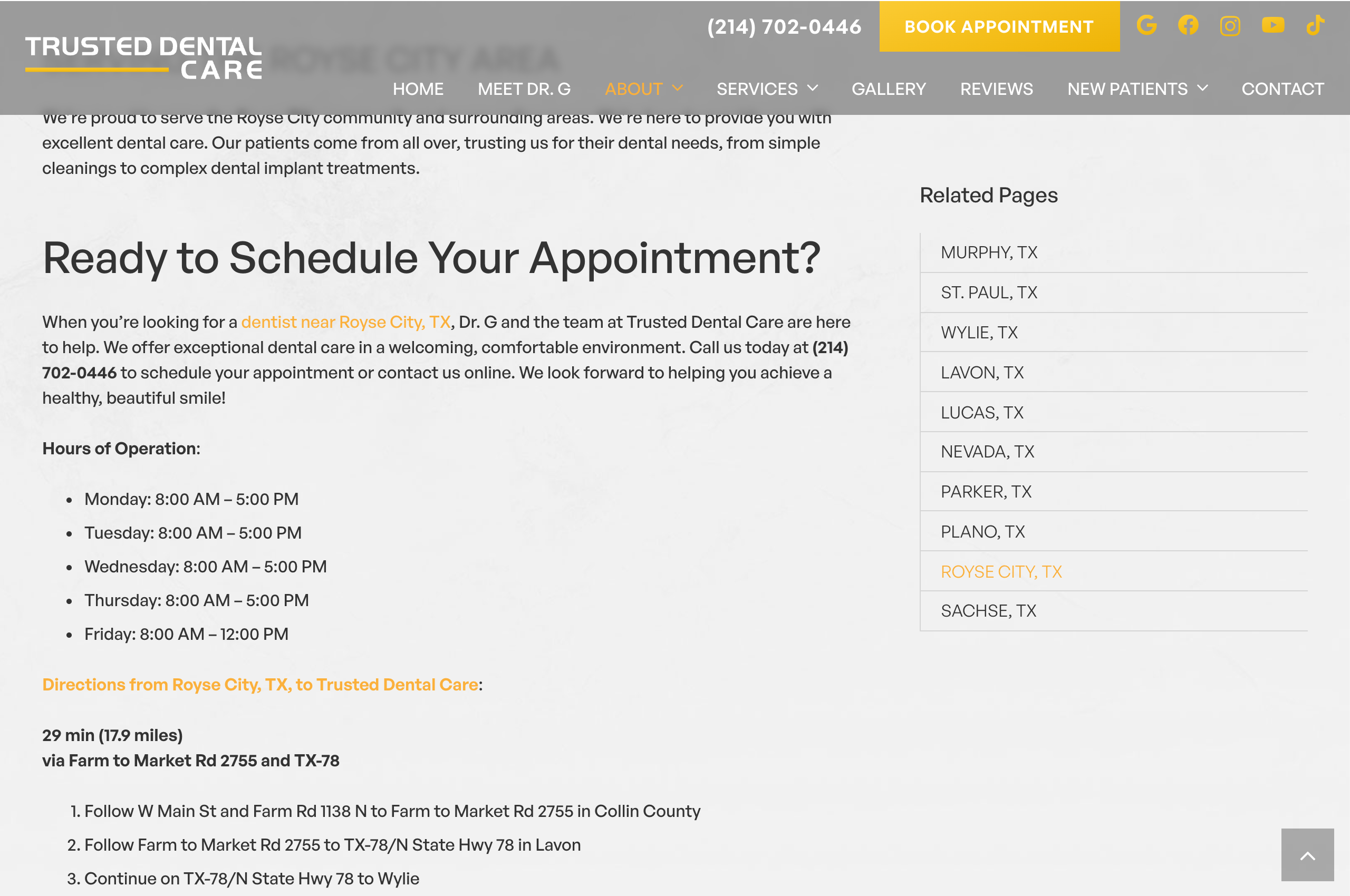
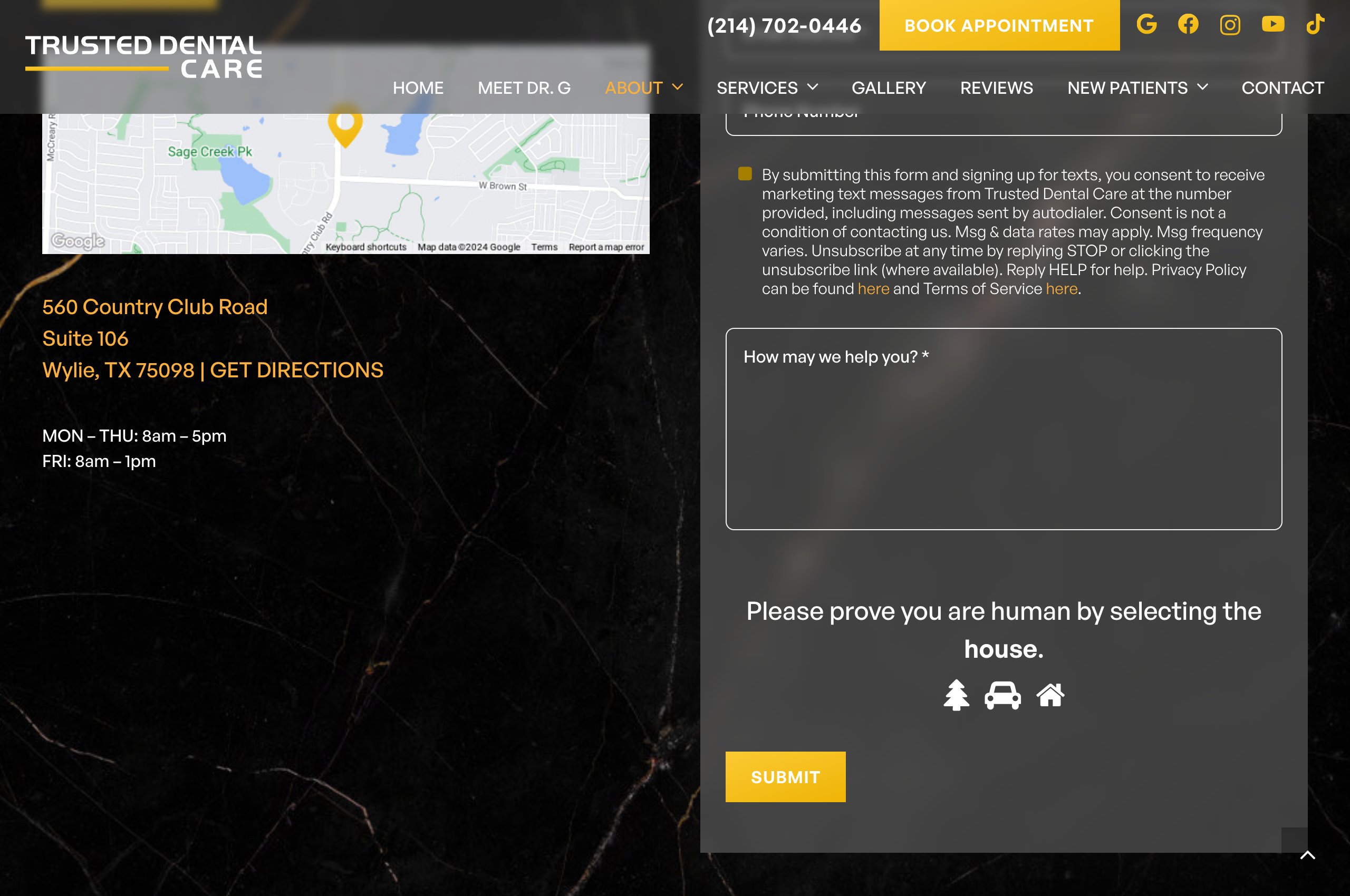
You don't even have to leave the page to get two different answers. A patient trying to book a Friday lunch-hour appointment has no idea which schedule is real, and Google's crawlers see two conflicting `openingHours` signals on the same URL.
When we talk about dental website maintenance inside a dental SEO program, we aren't just talking about server backups and SSL certificates. We are talking about operational hygiene: making sure every page, city landing page, schema block, and Google Business Profile agrees on the facts that get a patient into the chair.
Every city page you publish is an operational debt you have to maintain
Agencies love selling batches of ten or twenty dental city pages because writing them once is easy. Maintaining the operational promises inside those twenty pages over three years is where everything breaks down.
Follow how a routine schedule change turns into website drift:
- Month 1: Your practice adds Saturday hygiene appointments. Your agency adds a paragraph touting "convenient Saturday hours" across twelve nearby-city pages to help convert commuters.
- Month 8: Staffing changes and you pause Saturday hours. The office manager tells the web team to remove Saturdays from the Contact page and Google Business Profile.
- Month 9: Nobody remembers that twelve suburb pages still promise Saturday appointments halfway down the body copy. Commuters click those pages from Google, try to book a Saturday slot that doesn't exist, and call the front desk frustrated.
That is why we tell practices to audit whether they actually need a separate page for every nearby city before publishing more URLs. Every extra page that repeats your hours, insurance rules, or doctor roster multiplies the places a future update can fail.
Next step
Find the SEO opportunities you should own.
See how we run dental SEO and local search operationsWho owns each operational fact on a dental website?
The root cause of outdated dental websites is blurring two completely different jobs: verifying the clinical or front-desk fact and deploying the update across every template.
Your web developer doesn't know which PPO networks your billing desk dropped this quarter. Your office manager doesn't know that clinic hours are hard-coded inside a JSON-LD schema script and twelve city-page templates.
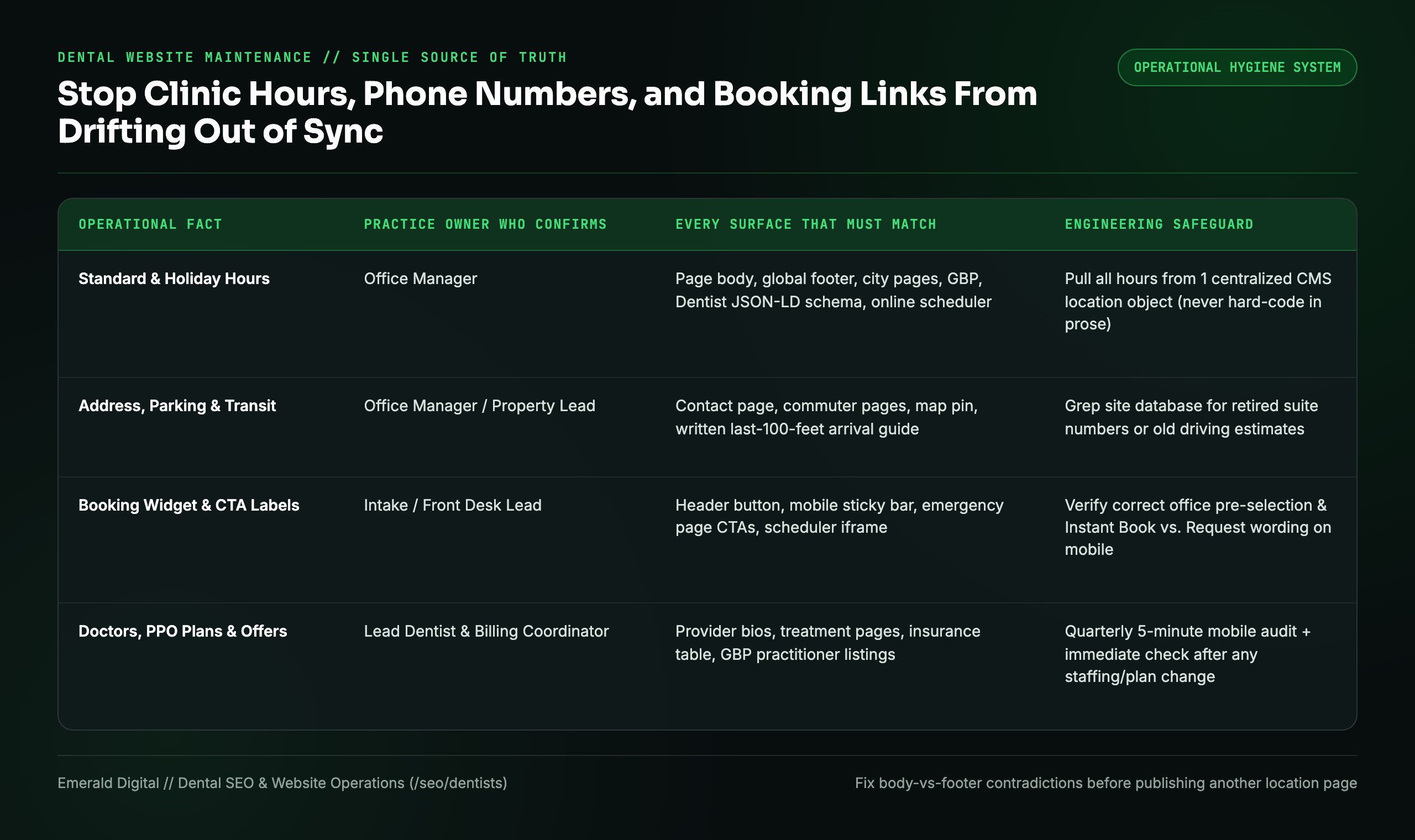
Fix this by separating Fact Confirmation from Surface Deployment in a single one-page ownership sheet:
| Operational Detail | Who Confirms the Fact at the Practice | Every Surface That Must Be Updated & Verified |
|---|---|---|
| Standard & Holiday Clinic Hours | Office Manager | Contact page, global footer, every city/location page, Google Business Profile, Apple Business Connect, `Dentist` JSON-LD schema, and online scheduler hours |
| Physical Address, Suite & Parking Rules | Office Manager / Property Lead | Header/footer NAP, embedded maps, written arrival and parking directions, and citation directories |
| Phone Numbers & Call Tracking | Front Desk Lead + Marketing Agency | Sticky mobile tap-to-call bar, desktop header, footer, GBP primary number, and live test call to confirm ring-through |
| Online Booking & Intake Forms | Front Desk / Intake Coordinator | Primary nav CTA, hero buttons, mobile drawer, embedded scheduling iframe (NexHealth, LocalMed, Flex, Dentrix), and confirmation screen copy |
| Doctors, Associates & Procedures | Lead Dentist / Clinical Director | About/Team bios, specific treatment pages, GBP practitioner listings, and `Physician` / `Dentist` schema markup |
| Insurance, Financing & Same-Day Rules | Treatment / Billing Coordinator | Insurance hub, service-page FAQs, same-day emergency promises, and new-patient special disclaimers |
Stop hard-coding clinic hours and phone numbers into article text
If your developer has to manually edit fifteen separate WordPress or Webflow pages every time your Friday hours change, your website architecture is broken.
Have your web team refactor repeated clinic facts into centralized global fields (or a single `Locations` collection in your CMS):
- Dynamic hours and NAP injection: Store each office's address, phone number, and Monday-through-Sunday hours in one central data object. Render the Contact page, the global footer, the city-page sidebar, and the `Dentist` JSON-LD schema directly from that single object. Change Friday closing from `1:00 PM` to `12:00 PM` in one field, and every page updates simultaneously.
- Run a reverse text search whenever a detail retires: Whenever you change a phone number, drop an insurance plan, change Friday hours, or switch scheduling vendors (for example, moving from Zocdoc to NexHealth), run a full-database grep for the *old* string (`1:00`, the old phone number, or the old booking URL). That five-minute search catches the forgotten sentence buried inside a three-year-old city page.
- Align closing time with last-appointment time: If your office closes at noon on Fridays and the last hygiene slot starts at 11:00 a.m., state both clearly (`Open Fridays 8 a.m. to 12 p.m. | Last appointment at 11 a.m.`) so patients don't think the scheduler is broken.
The 5-step mobile audit to run after every practice change
Don't review your dental website on a 27-inch desktop monitor in your back office. Eighty percent of urgent and local dental searches happen on a smartphone. Whenever your hours, providers, or booking tools change, pick up your phone and run this five-step check in three minutes:
- Check the treatment address at the top of the page: Open your highest-traffic suburb or treatment page. Is it immediately obvious which physical office the patient will visit?
- Compare the hours in three places: Check the body copy, scroll to the footer, and tap through to your Google Business Profile. All three must match to the minute.
- Tap the mobile phone button: Confirm the `tel:` link dials the right tracking or front-desk number and routes to the right location menu.
- Tap the primary "Book" CTA: Walk all the way to the time-selection screen without submitting a fake lead. Verify that the correct office location is pre-selected and that the button label matches reality (`Book Instant Appointment` vs. `Request an Appointment Call`).
- Validate structured data for AI search and Google: According to Google's documentation for AI Overviews and AI Search, structured data must match the visible text on the page. When your visible hours and schema markup agree with your Google Business Profile, both traditional local search and AI answer engines trust your clinic data.
Before you let an agency sell you another batch of location or service pages, ask them one operational question: *when our Friday schedule changes next quarter, how many places on our site have to be edited, and who verifies that every single one matches?*
See how we build clean, high-converting dental websites and local SEO systems, or request a free dental SEO teardown: we will audit your live pages, flag every conflicting hour, broken booking path, or doorway risk, and show you how to turn more local searches into booked chairs.