Most growth meetings about demo conversion rates start with the wrong question. A VP of Marketing announces that the website demo conversion rate dropped from 2.8% to 1.9%, and the team immediately starts redesigning the hero headline, shortening the form fields, or arguing about the color of the submit button.
That reaction fails because a single blended demo conversion rate is a vanity composite. It collapses four entirely separate operational handoffs into one useless number.
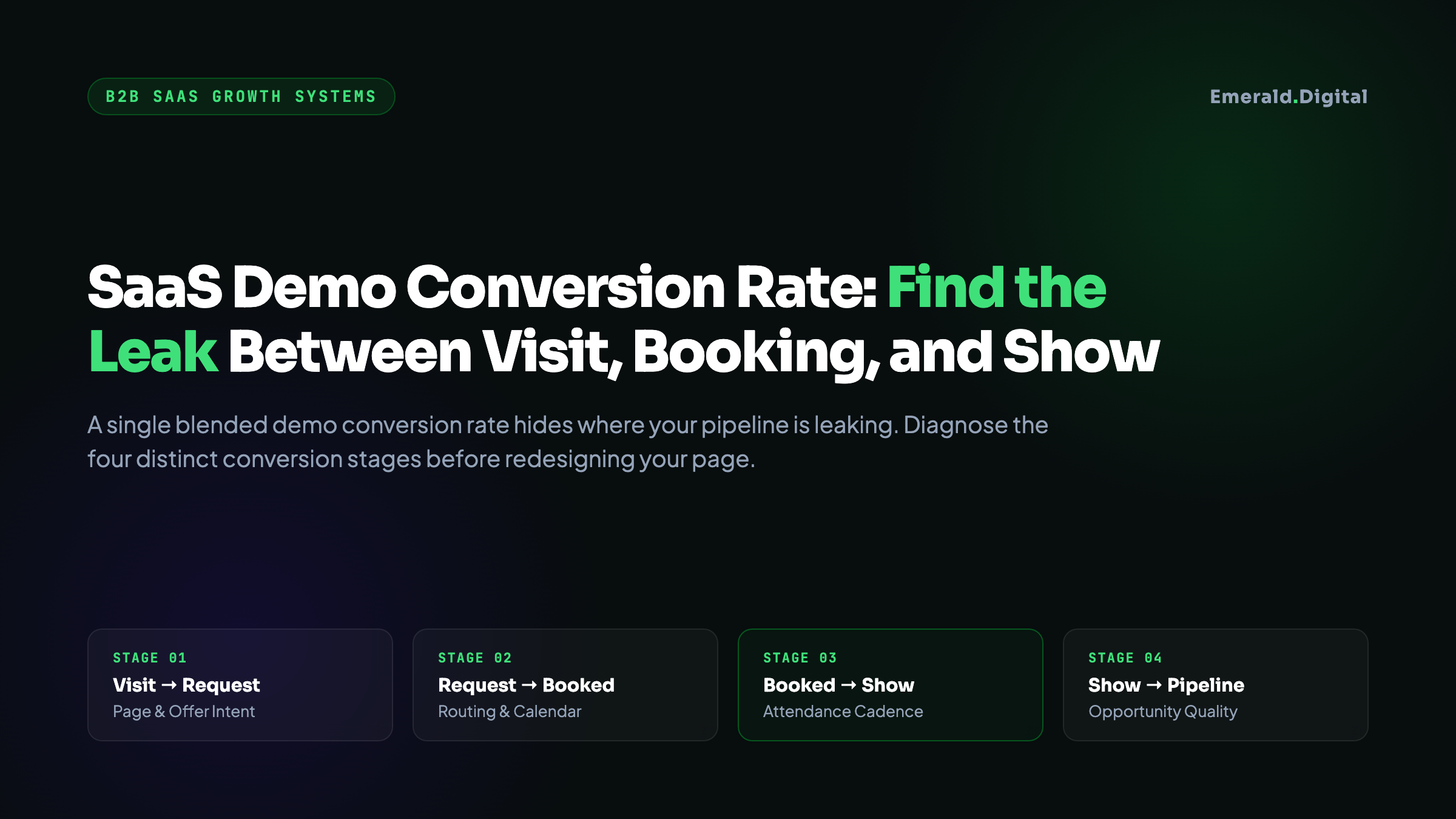
When a B2B SaaS buyer visits your website, they do not just convert or bounce. They move through four distinct milestones:
- They visit the page and submit a request.
- They select a calendar slot and confirm a booking.
- They actually show up to the scheduled meeting.
- The sales rep qualifies the conversation into an active pipeline opportunity.
If your visitor-to-request rate is holding steady at 3%, but your calendar booking drop-off is 45% because of slow routing, redesigning your landing page copy will not fix your pipeline. Similarly, if you generate 100 booked demos a month but 40% ghost the meeting because your confirmation emails lack context, your problem is show-rate mechanics, not top-of-funnel conversion rate optimization.
Before changing a single line of copy on your demo page, you must separate your funnel into its four component denominators.
``` [The 4-Stage SaaS Demo Funnel]
[ Website Visitors ] │ ▼ (Stage 1: Visit-to-Request Rate) [ Demo Requests Submitted ] │ ▼ (Stage 2: Request-to-Booking Rate) [ Confirmed Calendar Bookings ] │ ▼ (Stage 3: Booking-to-Show Rate) [ Completed Meetings Attended ] │ ▼ (Stage 4: Demo-to-Opportunity Rate) [ Qualified Sales Pipeline ($) ] ```
---
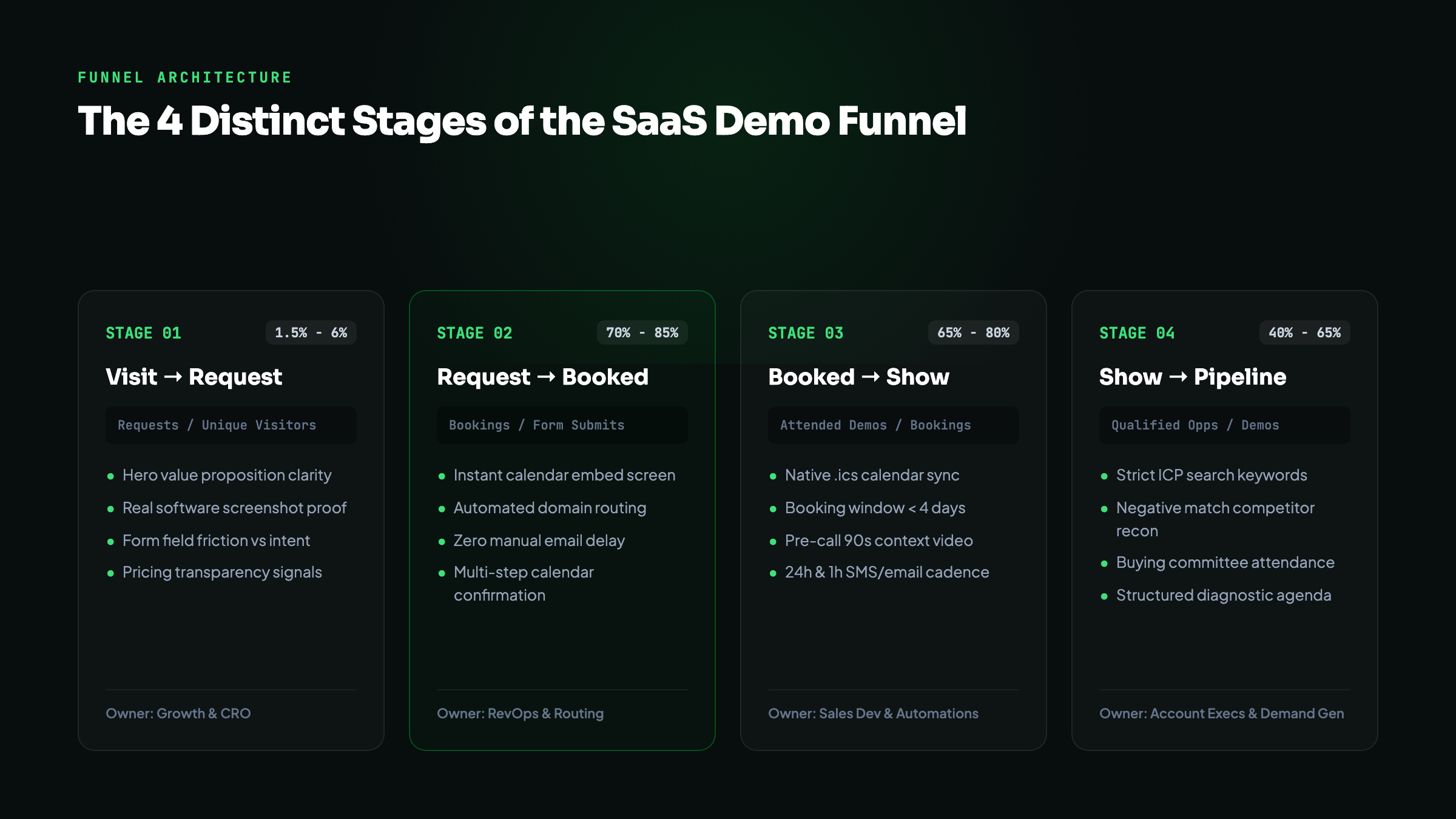
The four distinct stages of the SaaS demo funnel
To isolate where your demo engine is leaking, instrument and track these four conversion milestones independently in your analytics and CRM systems:
Stage 1: Visit-to-Request Rate (Page Conversion)
* The Formula: `(Demo Form Submissions / Unique Visitors to Demo Page) * 100` * What It Measures: Messaging clarity, buyer intent, proof credibility, and form friction. * Where It Breaks: Unclear product positioning, missing pricing transparency, lack of tangible software screenshots, and demanding 12 mandatory fields before establishing trust.
Stage 2: Request-to-Booking Rate (Scheduling Velocity)
* The Formula: `(Confirmed Calendar Bookings / Demo Form Submissions) * 100` * What It Measures: Friction in your scheduling and routing architecture. * Where It Breaks: The dreaded "Thank you, an SDR will contact you within 24 to 48 hours" confirmation screen. In B2B SaaS, every minute of delay between form completion and calendar selection degrades buyer motivation. If you do not let qualified prospects pick a time slot immediately, drop-offs typically exceed 35%.
Stage 3: Booking-to-Show Rate (Attendance Reliability)
* The Formula: `(Completed Meetings / Confirmed Calendar Bookings) * 100` * What It Measures: Calendar deliverability, scheduling distance, and perceived meeting value. * Where It Breaks: Booking meetings more than five business days in the future, calendar invites that land in spam folders, and vague meeting agendas that fail to explain what the prospect will learn.
Stage 4: Demo-to-Opportunity Rate (Pipeline Qualification)
* The Formula: `(Sales-Qualified Opportunities / Completed Demos) * 100` * What It Measures: Traffic quality, ICP targeting precision, and sales discovery execution. * Where It Breaks: Bidding on loose search queries that attract students, hobbyists, or competitors doing research (the Fake Lead Tax), junior SDRs giving generic product tours instead of diagnosing business constraints, or pricing misalignments that disqualify prospects after the call.
---
The demo leak diagnostic matrix
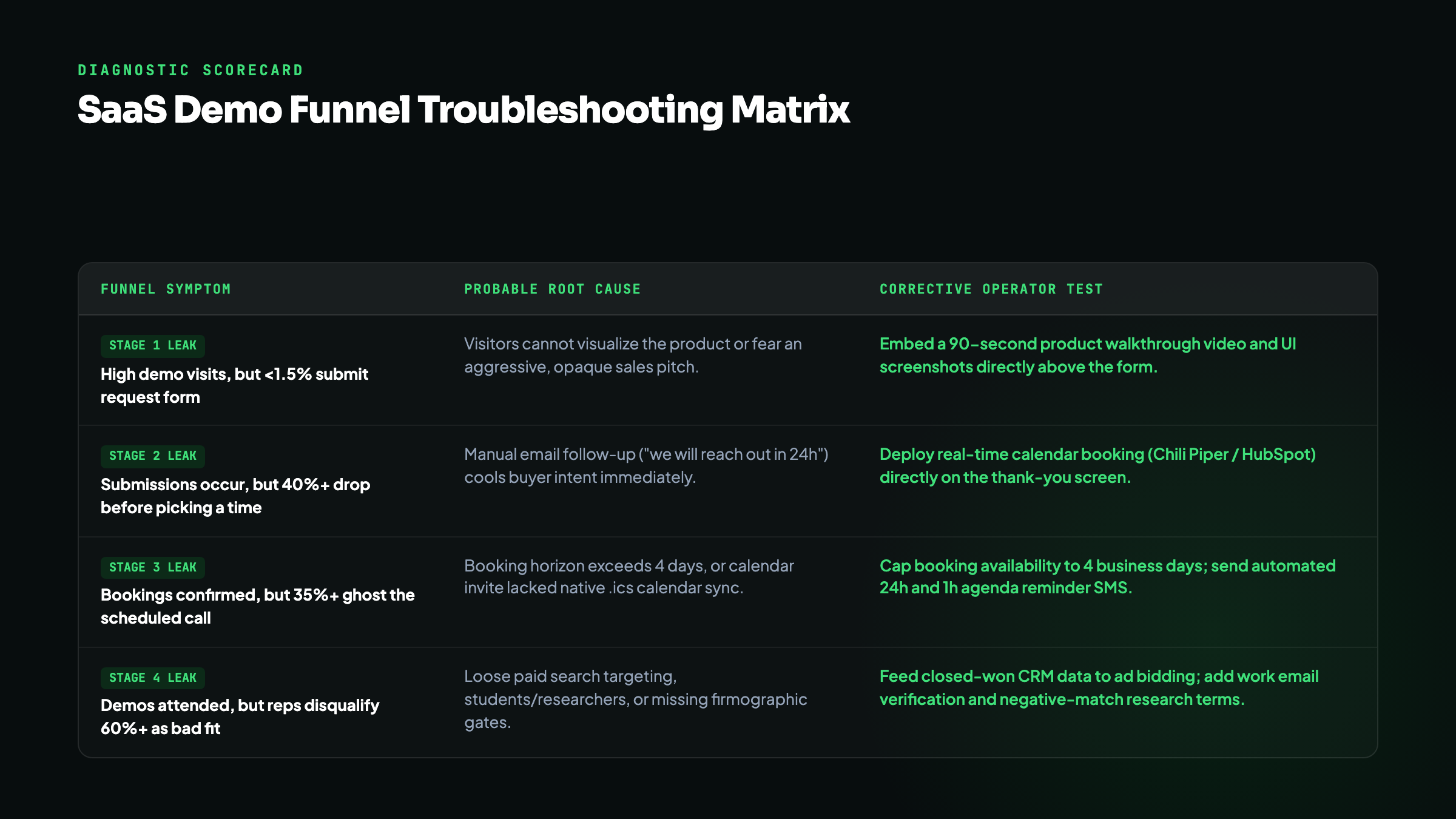
When marketing and sales disagree on lead quality, use this diagnostic matrix to match the observable funnel symptom to its underlying operational cause and corrective test:
| Observable Funnel Symptom | Candidate Root Cause | Data Required to Diagnose | Corrective Test to Deploy |
|---|---|---|---|
| High demo page traffic, very low form submissions (<1%) | Message mismatch or fear of an aggressive sales pitch. | Scroll depth, session recordings, and traffic intent source. | Add a 90-second product walkthrough video and interactive feature tour above the form. |
| High form submissions, massive drop-off before calendar booking | Manual routing delay or broken calendar integration. | Form completion timestamps vs calendar booking timestamps. | Embed automated calendar scheduling directly on the form confirmation screen. |
| High bookings, but 35%+ of prospects ghost the meeting | Booking horizon too long, or calendar invite deliverability failure. | Average days between booking and meeting date; calendar email bounces. | Cap scheduling availability to 3 business days; deploy a 24-hour SMS and email agenda reminder. |
| High show rates, but SDRs reject 60%+ as unqualified | Loose ad targeting, student/freelance clicks, or non-ICP search terms. | Google Ads search term reports, LinkedIn company size filters, and CRM firmographics. | Add Clearbit/Apollo auto-enrichment to disqualify non-ICP domains and negative-match research queries. |
| Qualified demos attend, but stall before contract review | Value proposition gap or pricing shock during discovery. | Call recordings (Gong/Chorus) and competitor comparison queries in CRM. | Publish transparent pricing tiers or pricing calculators prior to demo request. |
---
Segmenting demo rates by acquisition channel
Comparing demo conversion rates across your entire website without segmenting by acquisition channel will distort your strategy. A 2% conversion rate from high-intent Google Search is fundamentally different from a 2% conversion rate from cold LinkedIn ads or organic blog posts.
``` [Conversion Profile by Acquisition Source]
Source: High-Intent Google Search ("accounting software for law firms") ├─ Visit-to-Request: 3.5% - 6.0% (High commercial urgency) ├─ Request-to-Booking: 75% - 85% └─ Booking-to-Show: 75% - 85%
Source: Account-Based LinkedIn Ads (VP Finance at 100-500 employee firms) ├─ Visit-to-Request: 0.8% - 2.0% (Interrupt-driven attention) ├─ Request-to-Booking: 60% - 70% └─ Booking-to-Show: 60% - 70%
Source: Organic Informational Blog Posts ("how to calculate DSO") ├─ Visit-to-Request: 0.2% - 0.8% (Research-stage visitors) ├─ Request-to-Booking: 50% - 60% └─ Booking-to-Show: 50% - 65% ```
When diagnosing conversion leaks, always isolate:
- High-Intent Search: Prospects actively searching for category alternatives, software comparisons, or specific feature integrations. These buyers have an immediate problem and should see high visit-to-request and high show rates. If this traffic fails to convert, your landing page is failing to prove product capability.
- Account-Based Paid Social: Prospects browsing social feeds who click on a relevant thought leadership or point-of-view ad. Because their visit was interrupt-driven, their visit-to-request rate will naturally be lower. Forcing them into an immediate 30-minute sales demo often fails; offering an ungated product tour or interactive calculator typically generates higher downstream pipeline.
- Organic Search & Content: Visitors reading diagnostic guides or industry analyses. These users are problem-aware but not yet vendor-seeking. Route them toward Strike Zone comparison content rather than expecting an immediate demo booking from a top-of-funnel article.
We dive deeper into aligning channel economics with deal sizes in our guide to B2B SaaS Google Ads conversion and our SaaS growth systems architecture.
---
The demo page operator checklist: 7 fixes before a redesign
Before commissioning an expensive agency redesign of your demo page, audit your current setup against these seven structural requirements:
1. Show the actual software in the opening viewport
Never use abstract 3D floating shapes, cartoon illustrations, or generic stock photography on a B2B SaaS demo page. Software buyers want to see the user interface, the reporting dashboards, and the workflow screens. Visual proof of product capability builds trust faster than any promotional headline.
2. Separate email capture from qualifying questions
Long forms with ten visible input fields kill mobile conversion. If you require qualifying data (company size, existing tech stack, annual revenue), use a two-step multi-step form:
- Step 1: Work email and name.
- Step 2: Two or three essential qualification dropdowns.
Once a buyer completes Step 1, you have captured their contact information even if they abandon Step 2, allowing for automated follow-up.
3. Eliminate the manual routing bottleneck
If your annual contract value (ACV) is below $50,000, do not force buyers into a manual SDR qualification delay. Use routing tools (Chili Piper, RevenueHero, or HubSpot Meetings) to qualify the company domain in real time and display an active calendar picker directly on the thank-you screen.
4. Provide a concrete, three-bullet agenda
Most software demos are painful because buyers fear being subjected to an aggressive 20-minute sales pitch. Replace the generic "Schedule a Consultation" button with a clear agenda:
- *"Review your current workflow and integration requirements."*
- *"A 15-minute walkthrough of the core features relevant to your team."*
- *"Transparent pricing review and custom implementation timeline."*
5. Compress the calendar availability horizon
Do not allow prospects to book meetings ten business days in advance. Buyer urgency cools rapidly, priorities shift, and no-show rates double when the appointment is more than four days away. Lock your calendar scheduling availability to the next three to five business days.
6. Verify calendar invite delivery and format
Check how your calendar booking system delivers the meeting invite. If your scheduling tool sends an email containing only a third-party link rather than a native `.ics` calendar invitation that automatically slots into Google Calendar or Microsoft Outlook, half your prospects will miss the appointment because it never landed on their primary schedule.
7. Deploy pre-meeting value sequences
Between the moment of booking and the call itself, send two structured touchpoints:
- 24 Hours Before: A calendar confirmation email featuring a 90-second case study or product video tailored to their industry.
- 1 Hour Before: A brief notification with the direct video conference link (Zoom or Google Meet) and the call agenda.
---
The practical SaaS demo audit worksheet
Use this framework during your weekly revenue operations sync to isolate conversion bottlenecks across each marketing channel:
| Funnel Metric | Benchmark Health Range | Red Flag Threshold | Primary Diagnostic Question |
|---|---|---|---|
| Demo Page Visitor-to-Request | 2.5% to 5.0% (Search) | Below 1.5% | Is the page showing real product UI and clear business outcomes, or abstract fluff? |
| Request-to-Calendar Booking | 70% to 85% | Below 55% | Are prospects forced to wait for manual email follow-up instead of instant booking? |
| Calendar Booking-to-Show | 65% to 80% | Below 50% | Is the booking horizon longer than 4 days, or are calendar invites missing native sync? |
| Show-to-Sales Opportunity | 40% to 65% | Below 30% | Are ad campaigns bidding on low-intent search terms or non-buyer job titles? |
When you track these four conversion milestones independently, you stop guessing why pipeline is missing. You can pinpoint the exact operational break, test a targeted fix, and build a predictable acquisition system.
If your team is looking to turn search demand and paid spend into qualified enterprise pipeline without burning budget on vanity clicks, inspect our complete B2B SaaS growth systems or request a growth teardown.