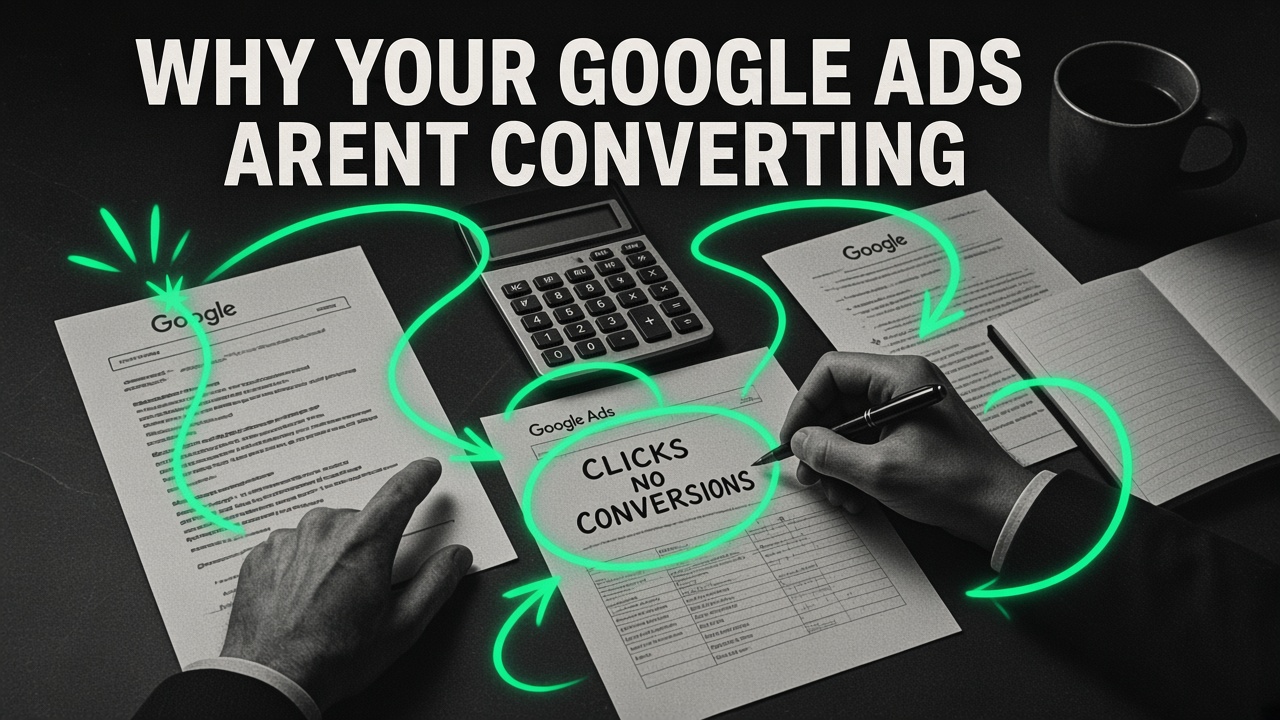
Nothing burns through marketing trust faster than a Google Ads account that spends thousands of dollars every week, posts a healthy click-through rate, and produces zero real customers.
When an account gets clicks and fails to convert, the worst thing you can do is let an agency or an automated Google rep talk you into "giving Smart Bidding more time to learn" or raising your daily budget. Algorithms cannot learn from broken tracking, and raising bids on bad search queries only buys you more non-buyers at a higher price.
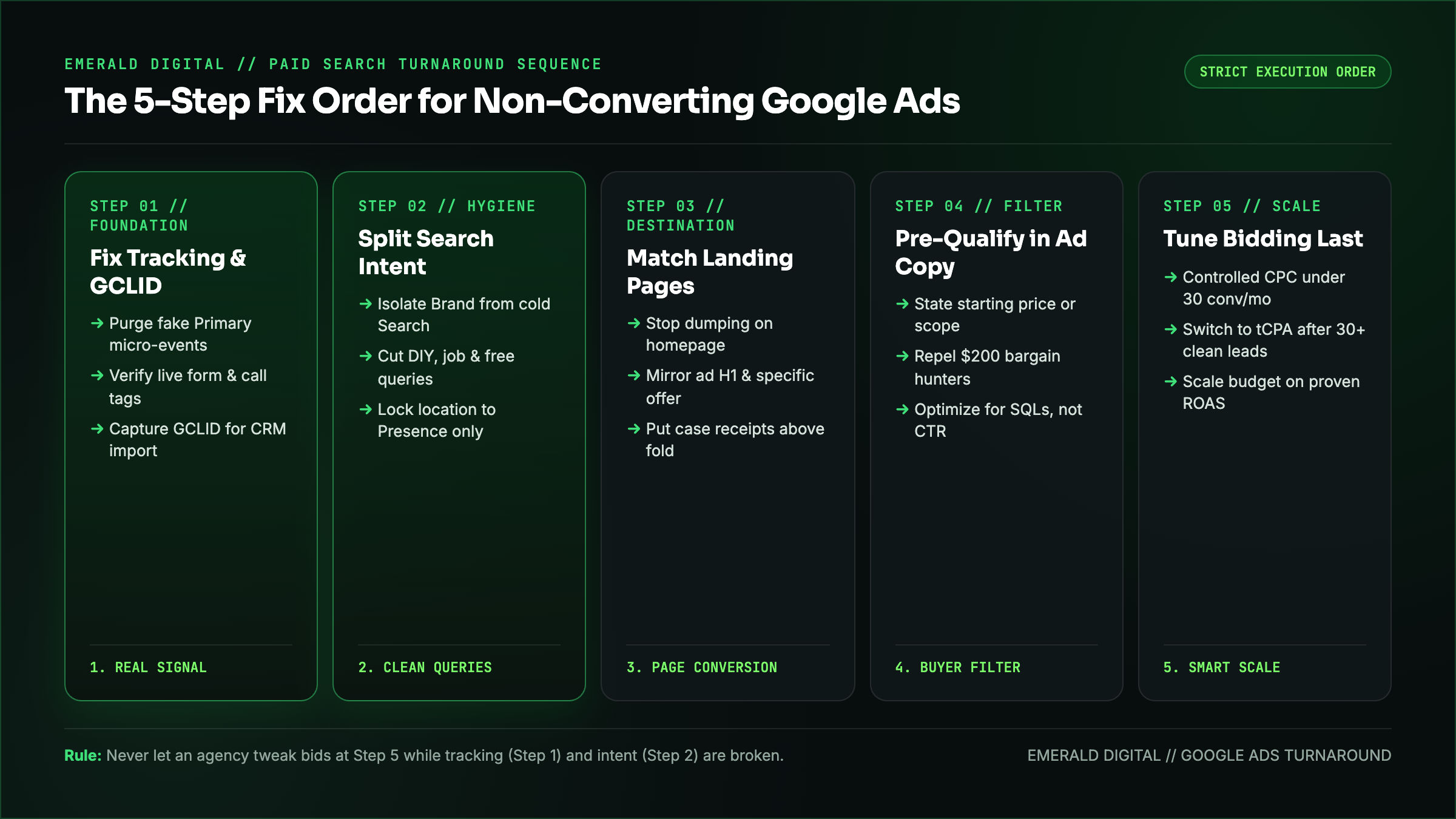
In twenty years of auditing paid search accounts, every non-converting Google Ads campaign comes down to five leaks. You have to diagnose and fix them in strict order, because fixing step five while step one is broken will wreck your account.
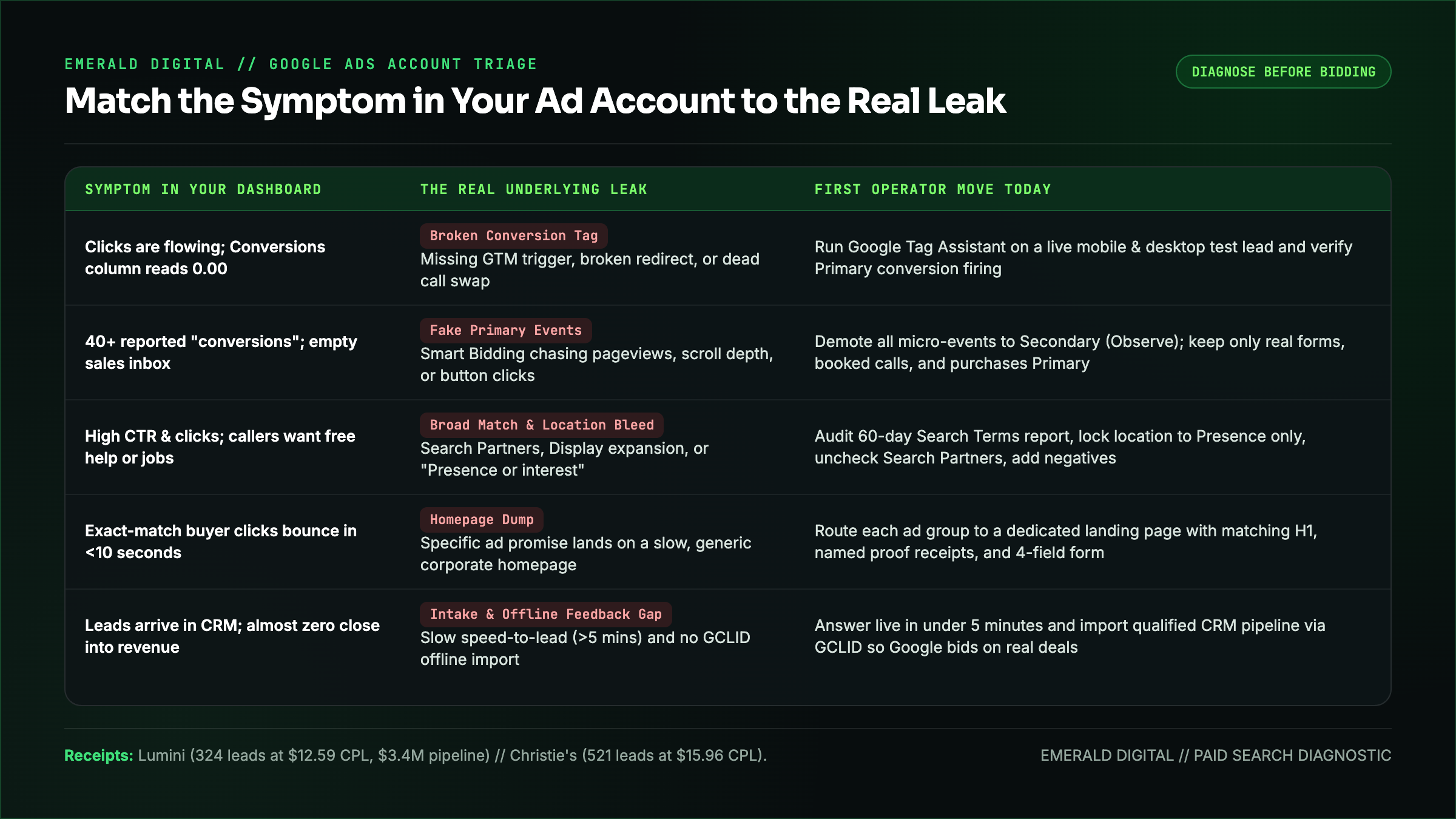
The Diagnostic Table: Match Your Symptom to the Real Leak
Before you change a single bid or ad headline, match what you see inside your Google Ads dashboard and CRM to the actual point of failure:
| What You See in Your Account | What Is Actually Broken | Your First Move Today |
|---|---|---|
| :--- | :--- | :--- |
| Clicks are coming in, and the Conversions column reads `0.00` across the board | Your conversion tag, GTM trigger, thank-you redirect, or call tracking swap is broken | Run Google Tag Assistant on a live mobile and desktop test submission and verify `Primary` conversion actions |
| Google Ads reports 40+ "conversions" a month, and your sales team says the inbox is empty | Smart Bidding is optimizing for junk micro-events (`Page view`, `Time on site > 30s`, `Button click`) set as Primary | Demote every non-lead micro-event to `Secondary (Observe only)` so bidding only optimizes for real calls, forms, or purchases |
| Impressions and clicks are high, CTR looks fine, and leads are unqualified or asking for free help | Broad match, Search Partners, Display expansion, or loose location settings are matching your ads to informational or out-of-market searches | Audit the last 60 days of the Search terms report, tighten match types, and add negative keyword lists |
| Exact-match buyer keywords are getting clicks, and visitors bounce in under 10 seconds | You are dumping specific ad clicks onto a slow, generic homepage that forces the buyer to hunt for the offer | Route each ad group to a dedicated landing page that mirrors the exact service, pricing context, and proof from the ad |
| Form fills and calls are coming in, and almost none turn into revenue | Slow speed-to-lead, high-friction intake, or zero offline conversion feedback into Google Ads | Respond in under 5 minutes and connect CRM offline conversion imports (`GCLID`) so Google bids on qualified pipeline, not spam forms |
Next step
Find the paid-media leaks before adding budget.
See how we turn Google Ads spend into customersStep 1: Fix Conversion Tracking Before You Touch Anything Else
If Google Ads cannot see what a real lead or sale looks like, every automated bidding strategy (`Maximize Conversions`, `Target CPA`, `Target ROAS`) will steer your budget into a ditch.
Audit your Goals > Conversions > Summary screen right now and verify four things:
- Test your live form and phone swap yourself. Open your landing page in an incognito window with Google Tag Assistant running, submit a test lead, and confirm the tag fires once (not zero times, and not twice).
- Purge fake "Primary" conversions. Only genuine bottom-of-funnel business outcomes belong in the Primary column: a completed lead form, a booked calendar call, a phone call lasting over 60 seconds from a real prospect, or a completed checkout. Move pageviews, scroll depth, and PDF downloads to Secondary.
- Turn on Enhanced Conversions and GCLID capture. Capture the Google Click ID (`GCLID`) in a hidden field on every form so you can feed qualified leads and closed deals from your CRM back into Google Ads.
- Separate brand clicks from non-brand conversions. A campaign that blends your own company name with cold category searches will hide a 0% cold conversion rate behind cheap clicks from existing customers looking for your login button.
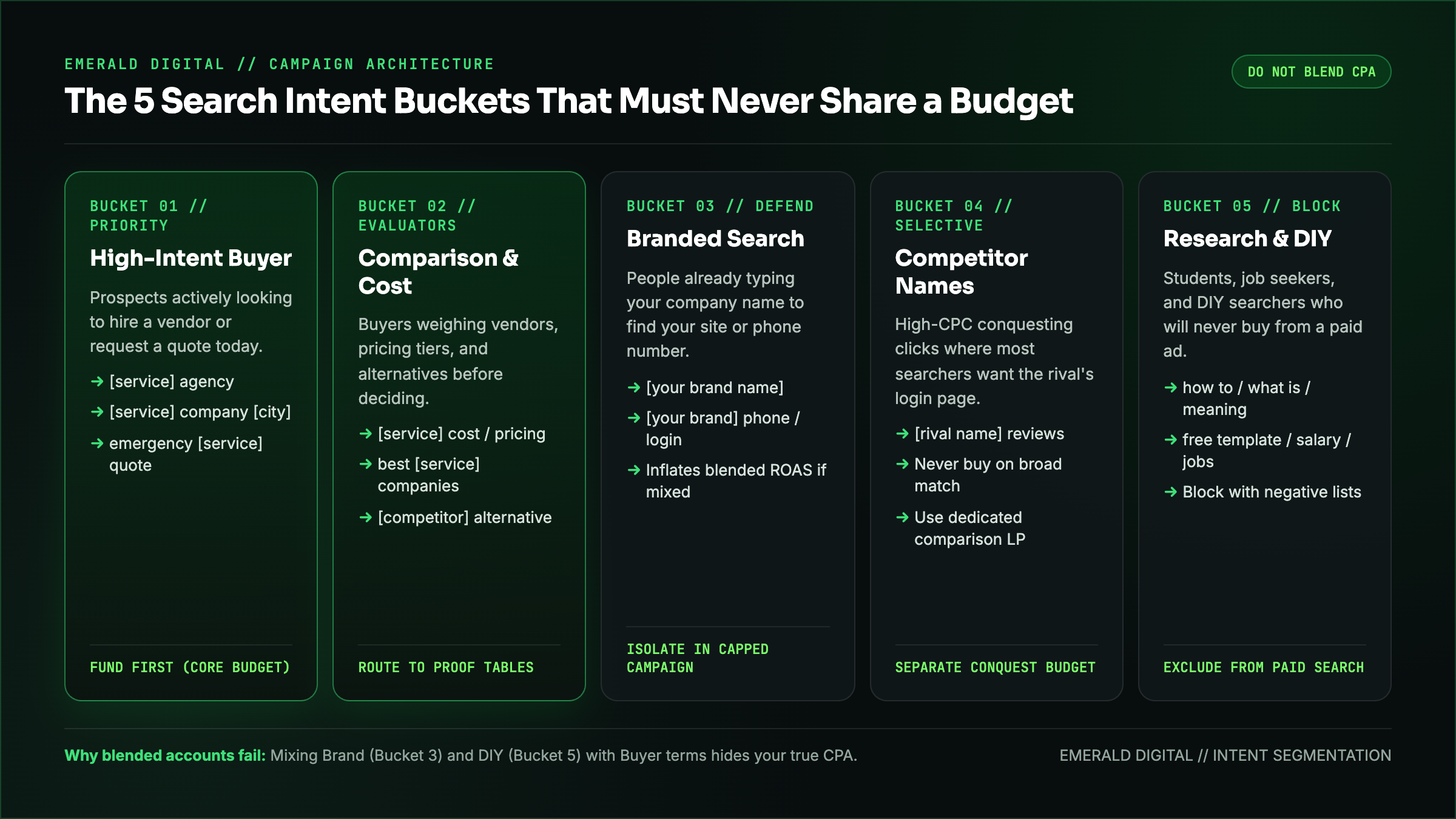
Step 2: Audit the Search Terms Report and Split Intent
What you typed into your keyword list is not what you are actually paying for. Open Insights and reports > Search terms for the last 30 to 90 days and sort by cost.
When we audit struggling accounts, we routinely find 30% to 60% of the budget going to four buckets that should never be mixed together:
- Informational & DIY searches: `how to`, `template`, `free`, `examples`, `reddit`, `course`, `meaning`, `salary`, `jobs`.
- Competitor support & login searches: People typing a competitor's name because they are already a customer trying to log in or cancel.
- Out-of-territory clicks: Triggered because campaign location options were left on Google's default *"Presence or interest"* instead of *"Presence: People in or regularly in your included locations."*
- Search Partners and Display Network bleed: Unchecked checkboxes inside Search campaign settings that quietly spend your search budget on low-quality partner sites and mobile app placements.
Lock your Search campaigns to Search Network only (uncheck Search Partners and Display expansion), set locations strictly to Presence, isolate Brand into its own capped campaign, and build an account-level negative keyword list that blocks job seekers, students, and freebie hunters on day one. (If you run a law firm where clicks run $150 to $300+, read our dedicated guide on what to do when Google Ads for lawyers gets too expensive.)
Step 3: Stop Sending Specific Ad Clicks to Your Generic Homepage
When someone searches `emergency commercial roof repair Dallas` or `enterprise SOC 2 compliance audit cost` and clicks your ad, they have a specific problem in mind. If your ad dumps them onto your corporate homepage where they have to read a vague mission statement and open a navigation menu to find that service, they hit the back button and click your competitor's ad instead.
Every core ad group needs a landing page built to close that exact search:
- Headline match: The H1 on the landing page should confirm within two seconds that the visitor landed in the exact right place for the query they just typed.
- Immediate proof above the fold: Show real client outcomes, review ratings, certifications, or before-and-after results before asking for their contact information.
- Frictionless mobile action: Make the primary CTA unmistakable on a phone screen, keep lead forms to 3 or 4 fields, and give high-urgency buyers a one-tap phone button.
- Fast load times: If your landing page takes four seconds to render over cellular data because of unoptimized scripts and hero videos, you are paying for clicks that bounce before the page even paints.
Step 4: Write Ad Copy That Pre-Qualifies Buyers (and Filters Out Bad Clicks)
High click-through rate is a vanity metric if you achieve it by writing vague, clickbait ads that attract people who cannot afford your service.
Your responsive search ads should do two jobs at once: pull in your ideal buyer and repel everyone else.
- If your B2B service starts at $3,500/month or your minimum construction project is $15,000, put that starting floor or target company size right in your ad headlines or descriptions. Anyone looking for a $200 quick fix will skip your ad, saving you the click cost and raising your conversion rate on the people who do click.
- Replace generic filler (*"Top Quality Service - Call Today for a Free Quote"*) with concrete specifics: turnaround times, specific niches served, licensing, or verified volume metrics.
Step 5: Tune Bidding Strategies Only After the Funnel Is Clean
Only after your tracking is accurate, your search terms are clean, and your landing page converts should you adjust your bidding strategy.
- If a campaign has fewer than 15 to 30 real, verified conversions in the last 30 days, automated `Target CPA` or `Target ROAS` often starves impression share or chases cheap junk clicks. Start with tightly controlled Manual CPC or Maximize Clicks with a strict max CPC cap on exact and phrase-match high-intent keywords until conversion volume is steady.
- Once the campaign consistently logs 30+ clean conversions a month, transition to Maximize Conversions (with a realistic Target CPA) fed by your CRM's qualified lead imports.
When we apply this exact five-step discipline to client accounts, the turnaround is fast:
- For Lumini, rebuilding the paid acquisition and landing page funnel generated $3.4M in pipeline and 324 qualified leads at a $12.59 CPL in 60 days.
- For United Collection Bureau, cleaning up search intent and call conversion paths produced a +482% increase in phone-call leads in 60 days.
- For Christie's International Real Estate, disciplined paid targeting and landing page alignment delivered 521 qualified leads at a $15.96 CPL.
Want Us to Audit Your Google Ads Account?
Do not throw another month of ad spend into a leaky bucket. Explore how we manage high-intent Google Ads, or request a free Google Ads teardown. We will inspect your conversion tracking, your last 90 days of search term waste, and your landing pages, and show you the exact fixes to turn your current ad spend into qualified pipeline.