Most Shopify SEO advice is a beginner checklist written by someone who has never managed a real P&L. Install a meta-tag app. Compress your JPEGs. Write a 500-word blog post twice a week. That advice is harmless, the way organizing your desk is harmless, and about as likely to grow your store's revenue.
Shopify makes it easy to stand up a storefront in a weekend. It also ships with a set of default Liquid template behaviors that quietly split your link authority, hide your best sub-categories behind unindexable filter parameters, and leave your highest-margin collection pages thin.
Here is the operator playbook for Shopify SEO: how to fix the platform's default technical traps, why your `/collections/` pages are your #1 revenue lever, and how we grew DuJour's web traffic 800% in nine months and drove $3.4M in pipeline in 60 days for Lumini.
Rank for non-brand buyer searches, or you aren't doing SEO
Open your Shopify analytics alongside Google Search Console and separate your branded search queries from your non-branded search queries.
If 85% of your organic clicks come from people typing your exact brand name into Google after seeing a Meta or TikTok ad, your SEO program isn't acquiring new customers. It's functioning as a toll booth for people who already decided to visit your store.
Real Shopify SEO captures non-brand commercial demand: the shopper typing `heavyweight merino wool hoodie`, `non-toxic ceramic frying pan set`, or `hydrate electrolytes for marathon runners`. Those shoppers have their wallet out, haven't chosen a brand yet, and buy from whichever store owns the top three organic and AI Overview positions. For the full cross-platform strategy, pair this playbook with our complete ecommerce SEO guide.
Next step
Find the SEO opportunities you should own.
See how we rank Shopify stores for non-brand buyersFix the four technical bugs Shopify ships with by default
Before you spend a dollar on content or backlinks, have your developer clean up the four structural leaks baked into almost every off-the-shelf Shopify theme.
| Default Shopify SEO Bug | Why It Hurts Rankings & Revenue | The Exact Fix | |
|---|---|---|---|
| **1. Duplicate `/collections/*/products/*` Internal Links** | By default, Shopify collection grids link to `/collections/mens/products/shirt` instead of `/products/shirt`. A product in 5 collections spawns 5 URLs, forcing Google to rely on canonical hints and diluting internal link equity. | Edit your theme's product-card Liquid snippet (`card-product.liquid`) and replace `{{ product.url \ | within: collection }}` with `{{ product.url }}` so every internal link points directly to the canonical `/products/` URL. |
| 2. Indexable Tag & Filter Parameter Bloat | Shopify automatically creates crawlable URLs for every product tag (`/collections/all/tag-name`) and `?filter.v.option=` parameter, creating thousands of thin duplicate pages. | Add `noindex, follow` rules for tag-appended collection URLs and raw parameter sorts while promoting high-search-volume combinations into dedicated Smart Collections. | |
| 3. Orphaned Automated Sitemaps | Shopify auto-generates `sitemap.xml` into child sitemaps (`sitemap_products_1.xml`, `sitemap_collections_1.xml`), including hidden test collections, zero-inventory promo pages, and duplicate variants. | Audit `sitemap_collections_1.xml` monthly; unpublish dead promotional collections or set `seo.hidden` metafields (`1`) on utility pages that should never be indexed. | |
| 4. App Script Bloat Killing Mobile Speed | Every uninstalled or poorly coded Shopify app leaves residual JavaScript in `theme.liquid`, pushing Largest Contentful Paint (LCP) and Interaction to Next Paint (INP) into the red on mobile. | Audit `theme.liquid` and Shopify App Embeds quarterly; remove dead third-party tracking scripts and lazy-load review widgets below the fold. |
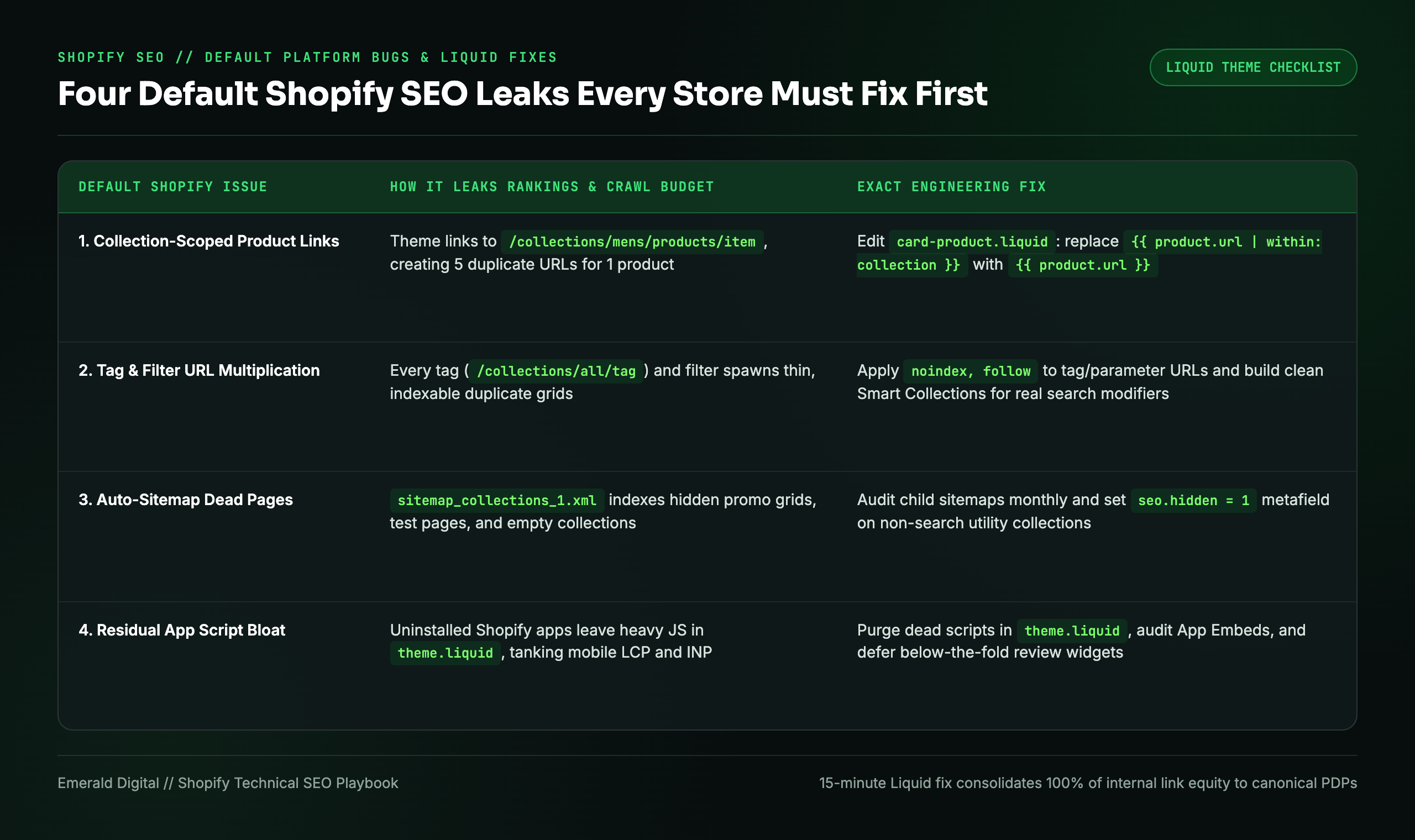
Fixing `within: collection` alone takes a developer fifteen minutes and immediately consolidates all internal link authority across your entire catalog onto your canonical `/products/` URLs.
Collection pages are the highest-leverage asset on Shopify
If you only fix one part of your Shopify store this quarter, fix your `/collections/` architecture.
New store owners obsess over individual product pages, yet shoppers rarely search for your specific SKU unless they already know your brand. They search for the category (`organic cotton crib sheets`, `mens waterproof chelsea boots`, `small batch hot sauce gift set`). In almost every commercial SERP, Google ranks collection pages where a buyer can compare options rather than a single product page.
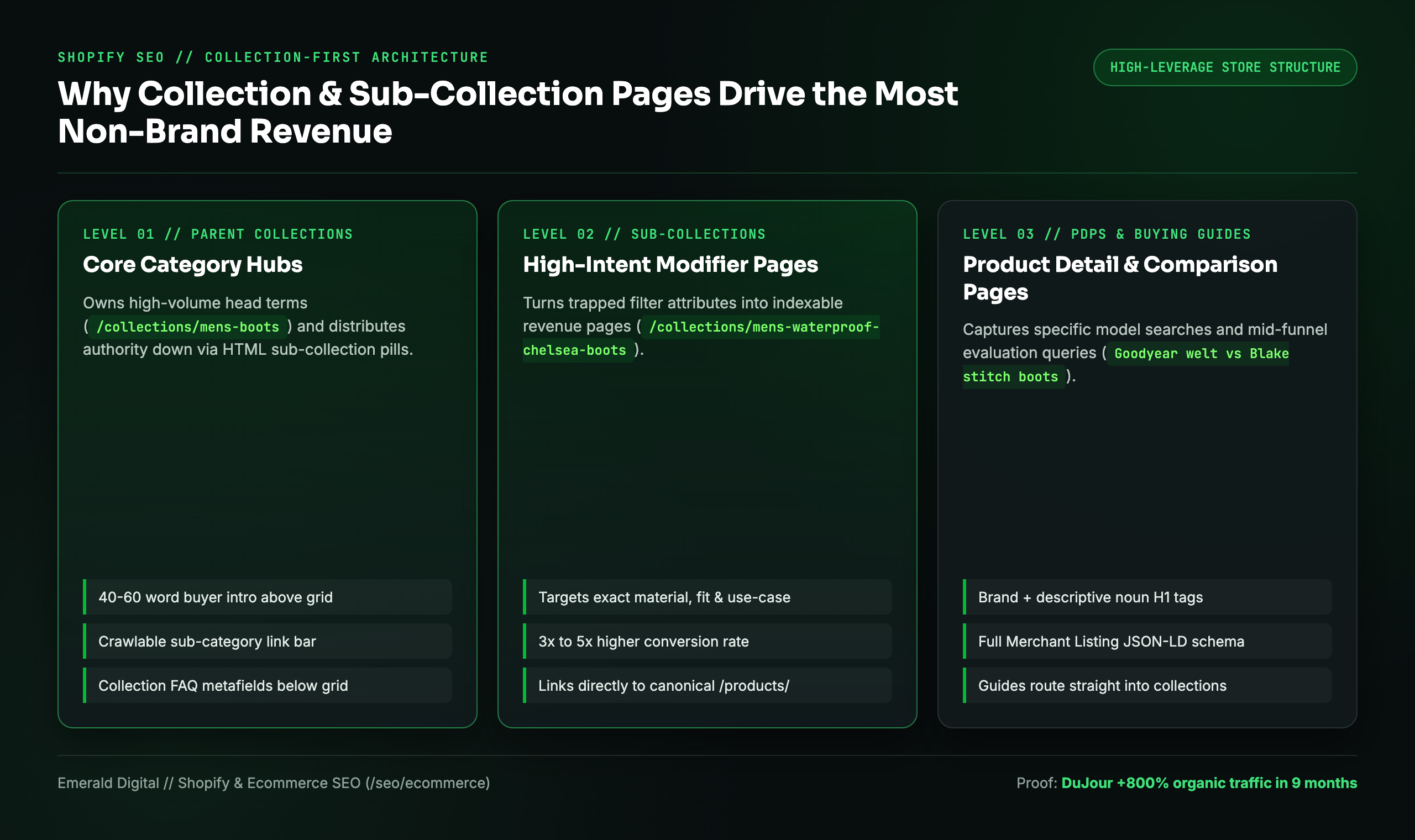
Here is how to turn default Shopify collection grids into high-ranking landing pages without ruining the shopping experience:
- Build granular sub-collections for search modifiers: Don't stop at `/collections/boots`. Look at your keyword research and build dedicated Smart Collections for the exact material, style, color, and use-case modifiers buyers search: `/collections/mens-waterproof-chelsea-boots`, `/collections/mens-suede-dress-boots`, `/collections/wide-width-work-boots`.
- Write a crisp 40-to-60-word intro above the product grid: State clearly what is in the collection, who it is built for, and the standout material or guarantee. Do not push the product grid below the fold on mobile with a wall of text.
- Add crawlable sub-collection pills at the top of the grid: Let shoppers (and Googlebot) click one level deeper from the parent collection into specific styles or materials via standard `<a href>` links.
- Place a structured buyer FAQ block below the product grid: Use Shopify collection metafields to render 3 to 4 genuine buyer questions (`How do your Chelsea boots fit compared to standard sneaker sizing?`, `Are the soles resoleable?`) with `FAQPage` schema below the products.
"Most store owners obsess over individual product pages and ignore their collection pages, which are the templates actually built to rank for how strangers search. Fix your collection hierarchy first and the entire catalog lifts."
Matthew Berman, founder, Emerald Digital
Upgrade product pages so they earn clicks and convert
Once your collection hierarchy is capturing broad and mid-tail shoppers, optimize your top-revenue `/products/` templates so they rank for specific model, ingredient, and problem queries and convert the traffic your collections funnel down.
If your store is already getting organic or paid visitors who leave without buying, read our teardown on why your Shopify store gets traffic but no sales. On the SEO side, every priority PDP needs:
- Descriptive H1 + Title Tag pairing: Pair your proprietary product name with the exact commercial noun phrase (`The Nomad Pack | 35L Carry-On Travel Backpack`).
- Complete Merchant Listing (`Product`) Schema: Ensure your theme outputs clean JSON-LD for price, currency, `InStock` availability, SKU, brand, shipping details, return policy, and `AggregateRating` so you win rich product snippets in Google Shopping and organic search.
- Zero manufacturer boilerplate: If you resell or distribute brands, never paste the vendor's default description. Rewrite the specifications, sizing guidance, and comparison notes from your team's hands-on testing.
The 90-day Shopify Strike Zone sprint
You don't need a year-long science project to see whether Shopify SEO works. You start in your Strike Zone: the non-brand commercial queries where your collections and products already rank between positions 5 and 20 in Google Search Console.
Moving a collection page from position 12 (top of page two) to position 4 (top half of page one) routinely increases clicks on that URL by 4x to 6x. Here is the exact 90-day sprint we run:
- Month 1: Liquid Cleanup & Strike Zone Mapping. Strip `within: collection` duplicate URLs, clean up tag/filter indexation bloat, validate Merchant Listing schema, and identify the top 15 Strike Zone collections and PDPs closest to page one.
- Month 2: Collection Expansion & PDP Overhaul. Launch missing sub-collections for high-intent modifiers, deploy collection intro + FAQ metafields, and upgrade internal linking between parent categories, sub-collections, and best-sellers.
- Month 3: Commercial Buying Guides & Digital PR. Publish high-intent comparison guides (`A vs B`, `How to Choose X`) wired directly to your collections, and earn editorial product placements and links from authoritative publications in your niche.
What this looks like when it works
We grew DuJour's web traffic by 800% over nine months by fixing structural crawl leaks and ranking the commercial pages that actually sell.
For Lumini, a DTC beauty brand, the same search, content, and conversion engine generated 324 qualified leads and $3.4M in pipeline in 60 days at a $12.59 cost per lead.
See how we rank Shopify and ecommerce stores for buyers, or request a free Shopify SEO teardown: we will inspect your Liquid URL structure, show you how much of your traffic is truly non-brand, and hand you the exact list of Strike Zone collections ready to move onto page one.