In traditional Search campaigns, you choose the keywords you want to bid on. In Google Shopping and retail Performance Max (PMax), you do not bid on keywords at all. Your Merchant Center product feed *is* your keyword targeting layer.
Most Shopify brands treat their product feed like a one-time plumbing chore. They install the free Google & YouTube sales channel app, click "Sync All Products," verify that 90% of their catalog shows green checkmarks inside Google Merchant Center Next, and hand the account over to a media buyer to tweak target ROAS sliders.
Then they wonder why 75% of their Shopping budget gets burned on two low-margin entry SKUs, why high-intent non-brand searches never trigger their best-selling products, and why Performance Max takes credit for branded repeat buyers instead of acquiring net-new customers.
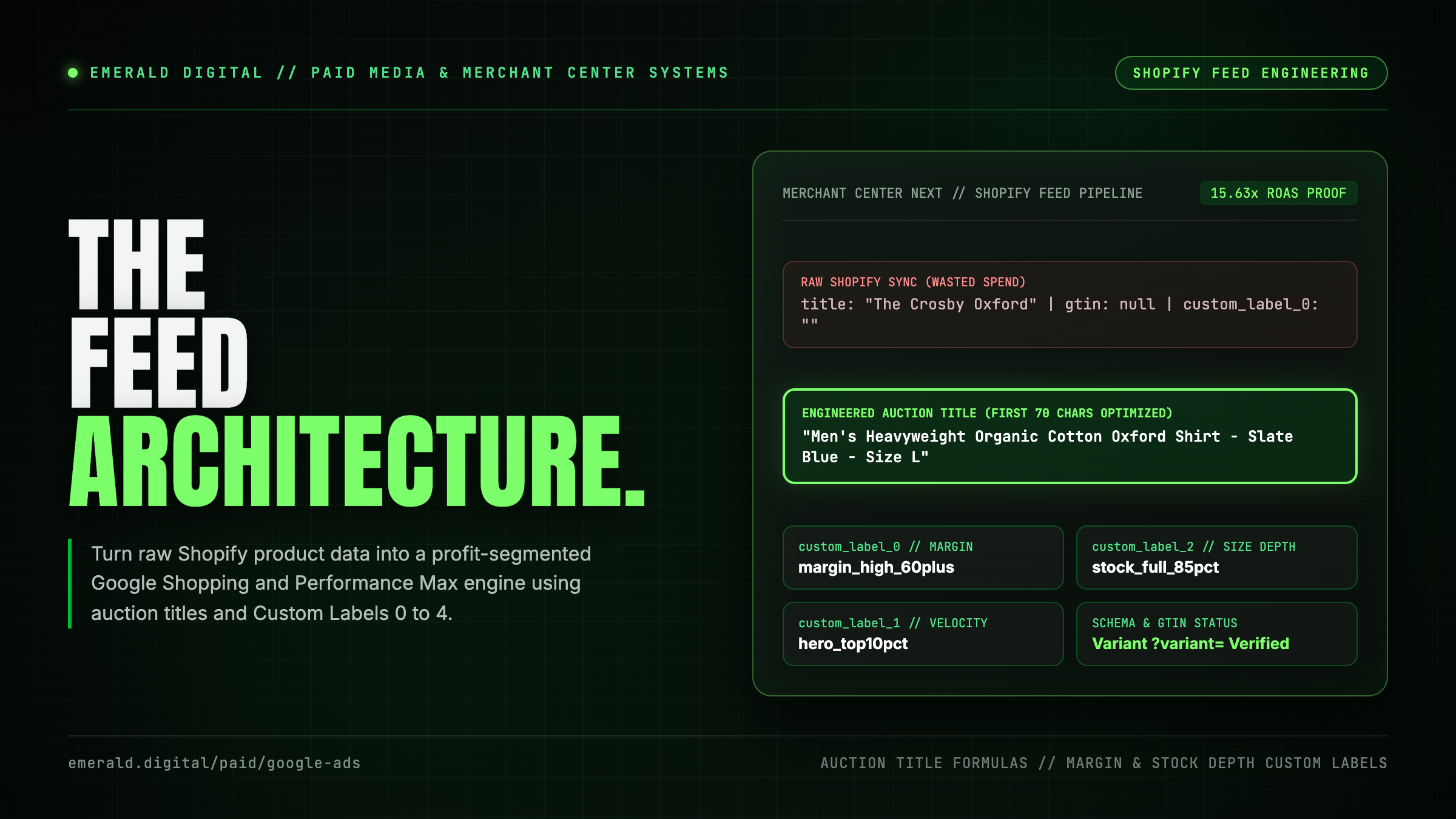
When we manage paid acquisition inside our Google Ads management program or rebuild store architecture through ecommerce SEO, we treat the Merchant Center feed as revenue infrastructure. Here is why Shopify's default sync quietly sabotages ad efficiency, how to engineer product titles and attributes for the auction, and how to wire `custom_label_0` through `custom_label_4` so every dollar of spend follows margin and inventory depth.
Why Shopify's default Merchant Center sync leaks ad spend
Shopify's native connector is built to get products listed with zero technical friction, not to win competitive Shopping auctions. When you push raw Shopify admin fields directly into Google Merchant Center without a transformation layer, five structural flaws immediately tax your campaigns:
- Storefront titles instead of search-query titles: On your Shopify store, a minimalist product title like *"The Everyday Crew"* or *"Cloud Serum"* looks sleek because the shopper is already inside your men's knitwear or hyaluronic skincare collection. Inside Google Shopping, that title gives the algorithm almost zero semantic context for `men's heavyweight merino wool crewneck sweater navy size L`.
- Missing GTINs, barcodes, and MPNs: When a manufacturer-assigned GTIN (UPC, EAN, or ISBN) exists for a product and your Shopify barcode field is blank, Google demotes your impression eligibility and strips your listing from high-intent product-comparison carousels where verified retailers compete.
- Flat or missing `product_type` hierarchies: Shopify's single native "Product Type" field usually holds a single flat word (`Shoes` or `Supplements`) instead of a full breadcrumb string (`Apparel & Accessories > Shoes > Men's Trail Running Shoes`).
- Variant cannibalization and ghost-stock waste: Pushing every size and color variant with equal priority frequently causes Google to spend thousands of dollars driving clicks to an apparel SKU where only size `XXS` and `XXL` remain in stock, tanking conversion rate.
- Zero margin or velocity segmentation: Without populated custom labels, a SKU with a 72% gross margin and a clearance SKU with an 18% gross margin sit inside the exact same PMax asset group under the same target ROAS target.
Here is the difference between a raw Shopify native sync and an engineered Merchant Center feed:
| Feed Attribute | Default Shopify Channel Sync | Engineered Merchant Center Feed | Impact on Auction & ROAS |
|---|---|---|---|
| :--- | :--- | :--- | :--- |
| `title` (150 chars max, 70 visible) | Pulls raw Shopify H1 (`The Apex Hoodie`) | Rule-built syntax (`[Brand] + [Gender/Age] + [Core Product Type] + [Material/Spec] + [Color] + [Size]`) | Unlocks non-brand query matching and lifts Shopping CTR on the first 70 characters |
| `gtin` / `mpn` + `brand` | Frequently blank or mapped to internal warehouse SKUs | Verified 12-to-14 digit GTINs populated at variant level; `identifier_exists` set accurately for custom goods | Prevents limited-performance warnings and qualifies listings for product review stars |
| `product_type` & `google_product_category` | Single flat tag or auto-guessed category ID | 3-to-4 level merchant breadcrumb taxonomy + exact numeric Google taxonomy ID | Gives Standard Shopping and PMax clean category nodes for bid and asset segmentation |
| `image_link` & `additional_image_link` | Default PDP hero image (often lifestyle crop or dark background) | Clean studio cutout on white/neutral background for `image_link`; lifestyle shots moved to `additional_image_link` | Eliminates promotional-overlay disapprovals and improves visual contrast in the Shopping grid |
| `custom_label_0` through `custom_label_4` | Completely empty | Dynamically mapped to Gross Margin Tier, Sales Velocity, Variant Stock Ratio, Price Band, and Seasonality | Allows media buyers to separate high-margin heroes from low-margin budget drains |
If your store is currently getting paid clicks that bounce without adding to cart, pair this feed overhaul with our diagnostics on why Google Ads are getting clicks with zero conversions and why your Shopify store gets traffic with no sales.
How to engineer Shopify product titles for the Shopping auction
Your product title is the single highest-weighted relevance signal in Google Merchant Center after your GTIN.
Never rewrite your visible Shopify storefront H1 just to stuff keywords into Google Shopping. Instead, keep your on-site PDP titles clean for human buyers (or structured for organic search using our Shopify SEO guide) and use a feed management pipeline (DataFeedWatch, Feedonomics, Simprosys, or Merchant Center feed rules) to assemble a dedicated Shopping `title` from your product metafields and variant options.
Because Google truncates Shopping card titles around 65 to 70 characters on most mobile and desktop carousels while still indexing all 150 characters for search matching, the order of attributes inside your title formula determines both what queries you match and whether the shopper clicks.
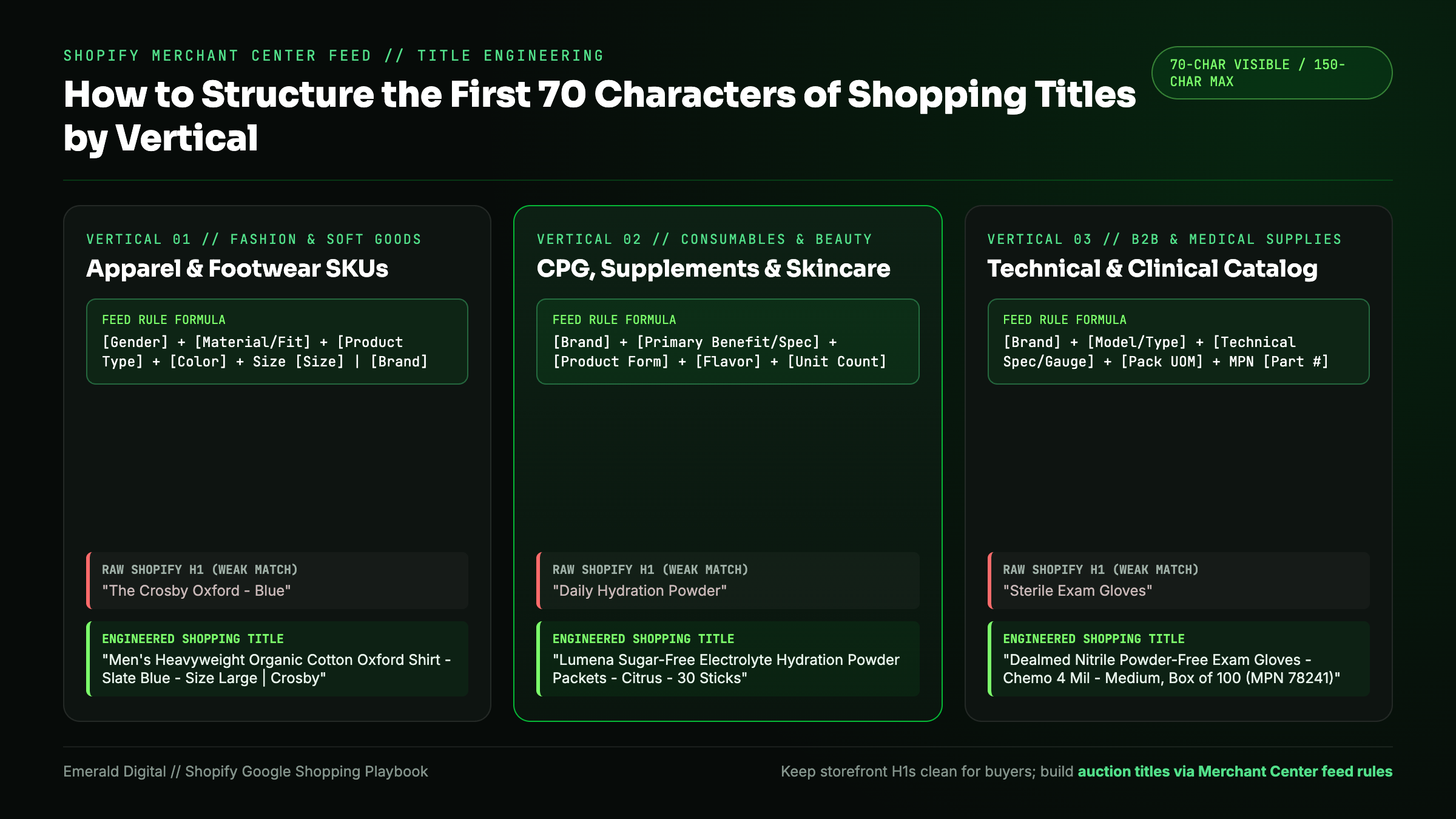
Use these three category-specific title blueprints:
1. Apparel, footwear, and accessories
Shoppers searching for apparel filter by gender, cut, material, color, and size. Put your brand name first only if you have strong search demand; otherwise lead with the descriptive category and material so non-brand shoppers see their exact search term before truncation:
- Formula: `[Gender/Age Group] + [Material/Fit] + [Product Type] + [Color] + Size [Size] + by [Brand]`
- Weak Shopify default: `The Crosby Oxford - Blue`
- Engineered Shopping title: `Men's Heavyweight Organic Cotton Oxford Shirt - Slate Blue - Size Large | Crosby Supply`
2. Consumables, beauty, and CPG supplements
In CPG and beauty, shoppers search by active ingredient, dietary constraint, form factor, and count or volume. Put pack size and unit weight inside the title so buyers immediately understand why a 3-pack costs $68 versus a $26 single bottle:
- Formula: `[Brand] + [Primary Benefit/Active Ingredient] + [Product Form] + [Flavor/Scent] + [Size/Unit Count]`
- Weak Shopify default: `Daily Hydration Powder`
- Engineered Shopping title: `Lumena Sugar-Free Electrolyte Hydration Powder Packets - Citrus Salt - 30 Stick Packs (4.2 oz)`
3. Technical hardware, B2B supplies, and medical catalog SKUs
In B2B, industrial, and medical supply catalogs, procurement buyers search by exact manufacturer part number (MPN), dimensions, gauge, compliance standard, and unit of measure (`Box of 100` vs. `Case of 1,000`).
- Formula: `[Brand] + [Product Name/Model] + [Technical Spec/Dimensions] + [Pack Quantity] + MPN [Part Number]`
- Weak Shopify default: `Sterile Exam Gloves`
- Engineered Shopping title: `Dealmed Nitrile Powder-Free Exam Gloves - Chemo Tested 4 Mil - Medium, Box of 100 (MPN 78241)`
We have seen firsthand how clean catalog taxonomy and attribute discipline compound across both paid and organic channels:
- [Eko](/case-studies/eko): By combining disciplined paid-media feed and campaign architecture with high-intent conversion paths, we delivered a verified 15.63x return on ad spend (ROAS).
- [Dealmed](/case-studies/dealmed): Across a complex medical supply catalog spanning 14,000+ pages, structuring category hierarchy, SKU specifications, and variant clarity turned a sprawling product database into a high-converting search engine asset.
Custom Labels 0 to 4: Segmenting PMax and Shopping by margin
Here is the dirty secret of unsegmented Performance Max campaigns: Google's algorithm optimizes for easiest conversion volume, not your bank account.
If you put 600 Shopify variants into a single PMax campaign with a 350% target ROAS, the algorithm quickly discovers that a $28 accessory or a low-margin entry bundle converts easily. It pours 70% of your daily budget into those low-margin SKUs while starving your $180 hero product that carries a 68% gross margin. On paper, your Google Ads dashboard reports a 3.5x ROAS. In reality, after cost of goods sold (COGS), picking/packing fees, and shipping, you lost money.
Google Merchant Center gives you five free slots (`custom_label_0` through `custom_label_4`) specifically to inject your internal business economics into the ad auction.
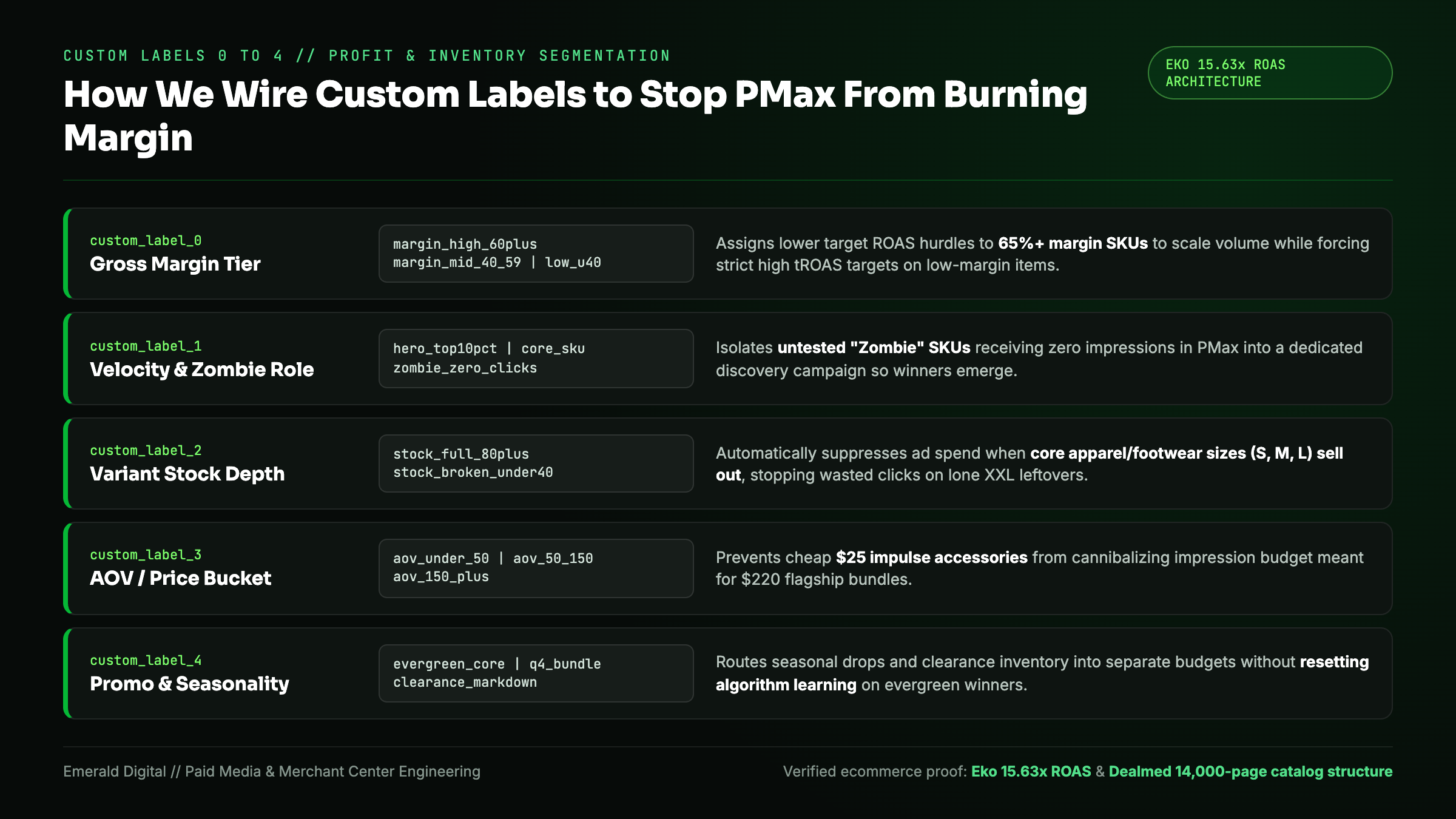
Here is the five-slot Custom Label architecture we deploy for Shopify brands:
| Custom Label Slot | Assigned Dimension | Dynamic Rule Values | How We Use It Inside Google Ads |
|---|---|---|---|
| :--- | :--- | :--- | :--- |
| `custom_label_0` | Gross Margin Tier | `margin_high_60plus` / `margin_mid_40_59` / `margin_low_under40` | Split campaigns by margin tier so high-margin SKUs can scale at a lower tROAS floor while low-margin SKUs require a strict high tROAS hurdle. |
| `custom_label_1` | Sales Velocity & Role | `hero_top10pct` / `core_catalog` / `zombie_zero_clicks` / `new_launch_30d` | Isolate "Zombie" SKUs (products getting zero impressions in the main PMax campaign) into a dedicated catch-all discovery campaign so they actually get tested. |
| `custom_label_2` | Variant Stock Depth | `stock_full_80plus` / `stock_partial` / `stock_broken_under40` | Automatically pause or down-bid apparel/footwear products when core middle sizes (`S`, `M`, `L` or `8` to `11`) sell out, stopping wasted clicks on broken size runs. |
| `custom_label_3` | AOV / Price Bucket | `under_50` / `50_to_150` / `150_plus` | Prevent $25 impulse accessories from stealing impression budget from $250 flagship units inside the same asset group. |
| `custom_label_4` | Promo / Seasonality | `evergreen` / `q4_gift_bundle` / `clearance_markdown` | Route promotional and seasonal drops into dedicated high-aggression campaigns without resetting learning on evergreen winners. |
That single rule on `custom_label_2` (Variant Stock Depth) saves apparel and footwear brands thousands of dollars every month. In Shopify, as long as *one* variant of a shirt is in stock (say, a single `XXS` in neon yellow), the parent product remains "In Stock." If you let Google keep bidding aggressively on that URL when 85% of your normal sizes are sold out, shoppers click the ad, land on the PDP, see their size crossed out, and bounce. Computing a variant availability ratio in your feed tool and auto-labeling anything below 50% size coverage as `stock_broken_under40` stops that leak overnight.
Fixing the three Merchant Center disapprovals that plague Shopify stores
Even the best title and custom-label architecture fails if Google Merchant Center disapproves your top-selling variants during a promotion. When we audit a Shopify Merchant Center account, 90% of item disapprovals trace back to three fixable technical mismatches:
1. Automatic item updates and `Product` JSON-LD variant price mismatches
Googlebot constantly crawls your Shopify product landing pages (`link` attribute in your feed) and compares the visible price and the `Offer` price inside your page's JSON-LD structured data against the price submitted in your feed.
Many older or heavily customized Shopify themes output only the `product.price_min` or `product.selected_or_first_available_variant.price` inside the theme's JSON-LD block, instead of dynamically outputting the price of the exact `?variant=123456789` URL parameter sent in the Shopping feed. When a King-size mattress variant costs $1,499 in the feed and your theme's schema reports the Twin price ($899) on the landing page, Google flags a Mismatched value (page crawl) [price] disapproval. Ensure your Liquid JSON-LD template binds `Offer.price` and `Offer.sku` directly to `product.selected_or_first_available_variant`.
2. Multi-currency geolocation redirects breaking US crawls
Google crawls your store primarily from US IP addresses (even when verifying feeds for Canada, the UK, or Australia). If you run a third-party Shopify geolocation or currency-converter script that automatically forces a popup or rewrites DOM prices based on browser IP, Googlebot sees USD prices on your UK or CAD landing pages and suspends the international feed. Use Shopify Markets with clean subfolder URLs (`/en-ca/`, `/en-gb/`) and pass the exact localized URL and currency code for each country target.
3. Missing `color`, `size`, `age_group`, and `gender` on apparel variants
For every product inside the `Apparel & Accessories` Google taxonomy tree, Google requires explicit `color`, `size`, `gender`, and `age_group` attributes, linked together by a shared `item_group_id` (your Shopify parent Product ID). If your Shopify store uses custom option names like `"Shade"` instead of `"Color"` or `"Waist"` instead of `"Size"`, map those custom option fields explicitly into Google's required attributes inside your feed tool so variants stay grouped and approved.
How to audit your Shopify Shopping feed this week
Before you raise budgets or blame Google's bidding algorithm for flat performance, run this five-point inspection across your Merchant Center Next and Google Ads accounts:
- Inspect Diagnostics in Merchant Center Next: Filter the "Needs Attention" tab by total click volume lost. Fix variant schema price mismatches, missing GTINs, and image overlay disapprovals on your top 50 revenue SKUs first.
- Check the first 70 characters of your top 25 product titles: Search your main non-brand category keywords on Google mobile and look at your own Shopping cards. If your titles cut off before stating the material, pack size, or differentiating spec, deploy a feed title formula immediately.
- Audit SKU concentration in Google Ads: Pull a Product ID report over the last 90 days. If fewer than 15% of your active SKUs consume 85% of your ad spend while profitable catalog items sit at zero impressions, your campaign needs custom-label segmentation.
- Wire `custom_label_0` (Margin) and `custom_label_2` (Variant Stock Depth): Connect your Shopify cost-per-item and variant inventory counts into your feed rules so bidding follows contribution profit and real size availability.
- Validate server-side conversion tracking and gross-profit bidding: Make sure Google Ads receives accurate transaction values, enhanced conversions, and new-customer acquisition signals so your segmented campaigns optimize toward real revenue.
If you want an operator team to audit your Merchant Center feed, fix variant schema leaks, and rebuild your Shopping and Performance Max structure around net margin, explore our Google Ads management services. We will inspect your live feed, show you where budget is leaking into low-margin or broken-stock variants, and map the exact feed and campaign fixes to scale profitably.